

User:Pineapple/Sandbox
More actions
Avardon New Players Guide
Welcome to Avardon! This guide is aimed at players who are familiar with Conan Exiles roleplaying servers, as well as such systems as Roleplay Redux (RPR) and Tot!Custom. In this guide, we will show you how to enter the Avardon server, create your character, become whitelisted and enter the world at large. We will also introduce certain systems such as research, profession energy, and briefly introduce certain key concepts relating to combat.
Introduction
Avardon is what is known as a ‘domain of dread’. It is its own demiplane set in a remote corner of the Shadowfell. You can read more about the realm of Avardon in our [[lore introduction]].
Characters may arrive in Avardon from other planes such as Toril or the Feywilds. At times the infamous mists of the demiplanes of dread may seep into other realms and inadvertently bring characters to Avardon. Or adventurous travellers may enter Avardon willingly, seeking opportunity or wishing to vanquish the darkness within.
Connecting

The #connection channel on the Avardon Discord server describes various convenient methods to connect to the server. Generally, you will wish to install the Conay launcher which will take care of installing mods and connecting to the server in a single click. Alternatively, the #connection channel provides a modlist.
Once you have launched Conan Exiles with the mods correctly installed, you will notice the ‘Quick Connect’ option in the main menu. Using this function is similar to using the Direct Connect function in the server list and the most convenient and quickest way to connect to the server.
Entering Avardon
As you enter the server for the first time, you will be prompted to provide a name for your character. Note that it is possible to change your name up until the point you are whitelisted using an NPC.
In the spawn area you will notice a few portals.
Character Creation: This portal leads you to an area where you can complete the steps to create and whitelist your character.
Design Area: This area provides you with a place and private changing rooms for creating your character appearance.
Arena: In the arena you can freely reset and create RPR sheets to try out various configurations of builds, spell selections, and equipment before settling on a class selection.
Avardon: This portal will lead you to the realm of Avardon. It is not possible to enter this portal until you completed the whitelisting process.

For the purpose of this guide please enter the Character Creation portal.
Character Creation
As you step through the portal and enter the Character Creation area, you will find a sequence of rooms numbered in the order you are recommended to visit them.
I. First Steps
In this room you will find a brief introduction to the lore and setting of the server. There are no important steps to take here other than immersing yourself in our setting.
II. Design
The next recommended step is to finish your character design. This includes selecting a race and potentially selecting a class, as your class selection may influence the way you design your character’s outfit. There are mannequins placed around the room that you can interact with. If you interact with a mannequin by pressing E, you can change their appearance to any available race to see an example appearance for that particular race.
There is also a portal leading to the Design Area, where you may find private changing rooms for the purpose of customising your character without an audience.
III. Whitelisting
At this stage we can start the whitelisting process. Whitelisting on Avardon is relatively simple. Important is that you take a screenshot of your character in front of the heightboard to provide in your whitelist ticket. For this screenshot, please take account of the following:
- Ensure that the camera is at a straight angle and not tilted up or down to distort the height of your character.
- There is a mannequin located next to the heightboard. For your screenshot to be valid, you must set the mannequin to your same race and include them in your screenshot.
- Make sure that you are not covering up any of your characters racial features with clothing or armour. This includes horns, tails, ears, and special skin textures depicting fur, scales, or other racial features. Wear a light outfit that does not obscure the general contours of your character’s physique.
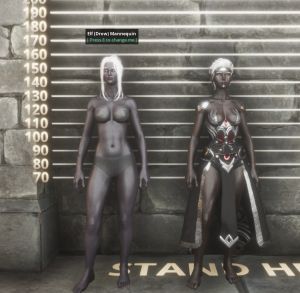
A correct heightboard picture. It clearly shows racial features such as hair colour, eye colour and ears. The mannequin is set correctly and included in the picture. And the character is fully displayed without wearing obscuring clothing or armour. - The picture should display the character’s complete body, from head to toes.
- Take a screenshot using a screen capture tool. Steam provides functionality for this. But you can also use Ansel (Alt+f2 by default) or the Tot photo tool. Do not use your mobile device to capture a photo of your monitor.

Staff may provide you additional instructions during the whitelisting process. For example, they may ask you to provide additional screenshots or provide feedback on your character’s appearance should it not conform to the racial expectations of your character’s selected race or general expectations of reasonable proportions and character portrayal.
IV. Character Sheet
While your whitelist ticket is still pending approval, you may continue to set your character sheet.
As a reminder, you may reset your sheet until you have verified your whitelist at the whitelist verification NPC (Lora). You can reset yourself by talking to Snorts, a kobold NPC located in the Character Sheet room.
Be sure to spend all your attribute and skill points.
V. Talents
In the Talents room you are able to perform your spell selection, feat selection, and the selection of special class features such as a warlock’s invocation or a divine soul’s special spell selection.
It is important to note that you can freely change your spell selection as long as you have not verified yourself at the verification NPC (Lora). You can freely do so using the spell selection NPC, Hoodini.
It is equally important to note that should you wish to change your feat and class feature selections, you will have to reset your entire character sheet using Snorts in the previous room. You may set your feat and class features by talking to Falko.
If you are uncertain about your selections, you may talk to Abubaker to be transported to the Arena. Here you can freely change sheets and selections and test them out in combat with other players to get a feel for your class and subclass and the abilities and spells that they have.
VI. Finalisation

Once you are satisfied with all your selections, you are free to enter the final portal at the end of the Talents room.
You will eventually return to the spawn area. Here you may speak to the verification NPC (Lora) to confirm your whitelist.
- IMPORTANT NOTE. Once you verify yourself with Lora, you can no longer adjust your character sheet, spell selections, feat selections or any other parts of your character build. While you remain unverified, you may still change you spell selection and feat selections. Though you may not deviate from the race, class, and subclass you have indicated in your Whitelist Ticket.
Visiting the Hub & Profession Energy
Once you have verified and entered the realm of Avardon through the portal you will find yourself just outside the main settlement of Avardon, Livarun. Within this settlement there are a couple of important NPCs relating to research and profession energy.
Profession Energy is gained at a rate of two per day. You may gain your daily Profession Energy by using the ‘Economy Reset’ ability in RPR. You can store up to four Profession Energy.
Profession Energy represents time and effort exerted by your character in the pursuit of knowledge and benefits from labour. You use your Profession Energy in the following ways:
- Learning the basics of any given profession, such as foraging, blacksmithing or chirugery, amongst others. For every spent Profession Energy you gain 5 skill levels in the chosen profession.
- Learning a new language. For every spent Profession Energy you gain 5% of the chosen language. As you learn a language you will be able to comprehend it better when listening to people speak the given language.
- Crafting or gathering using your profession. Such as smithing as a Blacksmith, or gathering from nodes as a Forager.
- Reselect your spells. This costs two profession energy for casters that have prepared spells. Specifically Wizard, Druid, Cleric and Paladin. Other casters will have to pay an additional 50 silver coin.
You may learn up to 100 points of skill in any combination of professions. For example, you may specialise by learning 100 of a single profession. Or you may spread out your points across four different professions. Should it be the case that you wish to unlearn a profession to free up skill points, you may speak to Gilderoy in the hub to help you with your skill issues.
Research such as learning a language or new profession may be done by speaking to Rubeus Farquaad in the hub.
Combat and Conflict
While in the realm of Avardon you may find yourself at odds with other players or some of the various creatures and non-player entities that exist within the realm. Avardon provides a combat system to resolve such situations.
When combat is about to occur, any of the involve players may decided to Roll Initiative and target nearby players. Targeted players are compelled to engage in combat. It is not possible not to consent to combat when you are the target of another playing initiating combat.
Any targeted players roll initiative automatically and the system will provide a turn order, resolving ties in rolls as needed.
The status bar can be used to quickly view your HP, movement range, AC and spell slots. The clock button can be used to end/start your turn.
If you would wish to learn more about the details of Combat and Movement, please see our Combat Guide and our Movement Guide.
Your Journey Starts Here
All the above should provide you with the necessary information to start your journey here on Avardon. Should you have any questions, you are always welcome to use #Questions channel on the Avardon Discord or open a ticket.
May the Gods have mercy on your soul.